Monday, 28 March 2011

Saturday, 4 December 2010
Evaluation: How did you use media technologies in the...?
..Construction?
When making the film I used both digital and film cameras. This gave me a bit of a difference with the quality but I was left with no choice because the batteries died in the first camera.
With these cameras i was able to use the zoom which gave a sharper image and helped to frame some shots.
During the editing I have used two Apple computers. An iMac and a MacBook Pro. On these I have used iMovie to edit the film. For further information see my post on editing.
http://matthewharrisa2media4079.blogspot.com/2010/12/editing.html
To comply with exam board specifications I have used blogger to submit my work electronically. In the past I have had some difficulty with the site but when completing this coursework it has been fairly good to me. there has been no error messages bar one and I managed to work around that. The image uploader said there was an error with the images I was trying to upload for the editing post. The only reason it didn't like them was because they were screen shots I had taken on the MacBook Pro. So I went around it and opened them up in Windows Picture Gallery, which did recognise them, and took screen shots from there. I then dumped them into Microsoft Office Picture Manager and cropped them.
The cameras that I used to film the video were:
A Canon MD205 video camera.
A Nikon Coolpix P60 digital camera.
(it's really a photo camera, it just has a film mode built in)
...Planning?
I used the Schools new VLE to have access to the evaluation questions and that's it really.
When making the film I used both digital and film cameras. This gave me a bit of a difference with the quality but I was left with no choice because the batteries died in the first camera.
With these cameras i was able to use the zoom which gave a sharper image and helped to frame some shots.
During the editing I have used two Apple computers. An iMac and a MacBook Pro. On these I have used iMovie to edit the film. For further information see my post on editing.
http://matthewharrisa2media4079.blogspot.com/2010/12/editing.html
To comply with exam board specifications I have used blogger to submit my work electronically. In the past I have had some difficulty with the site but when completing this coursework it has been fairly good to me. there has been no error messages bar one and I managed to work around that. The image uploader said there was an error with the images I was trying to upload for the editing post. The only reason it didn't like them was because they were screen shots I had taken on the MacBook Pro. So I went around it and opened them up in Windows Picture Gallery, which did recognise them, and took screen shots from there. I then dumped them into Microsoft Office Picture Manager and cropped them.
The cameras that I used to film the video were:
A Canon MD205 video camera.
A Nikon Coolpix P60 digital camera.
(it's really a photo camera, it just has a film mode built in)
...Planning?
In the planning stage I used a new website to me called Scribd.com. This site allows people to upload Microsoft Office word documents which can then be linked to things such as blogs. I uploaded my Shooting Schedule and Director's Pitch.
.
...Research?
During the research and TA research I uploaded the animatic to YouTube and sent out messages via facebook asking people to send me their thoughts. This allowed me to get a wide range of feedback and a good idea of what peoples general thoughts were.
.
...Evaluation?
During the evaluation I used no more new technologies than the ones I had already used in the rest of the project.
I used the Schools new VLE to have access to the evaluation questions and that's it really.
Evaluation: What have you learned from your target audience feedback?
From gathering audience feedback I have learned that the majority overrules.
From a business stand point it is more efficient to create a digipak that can be sold to the majority of the market rather than change it to meet the opinions of a hand full.
There have been a few criticising comments but I think by looking into them I have been able to see which is the better option. For example with the advert I looked into a green patterned design because someone said it was a bit plain. Only when I had both designs did I realise that the red one was better.
I have also learned that the target audience can be very sheepish yet firm. They know what they like and they will go with it following the leader. however if they don't like something then they will object.
From a business stand point it is more efficient to create a digipak that can be sold to the majority of the market rather than change it to meet the opinions of a hand full.
There have been a few criticising comments but I think by looking into them I have been able to see which is the better option. For example with the advert I looked into a green patterned design because someone said it was a bit plain. Only when I had both designs did I realise that the red one was better.
I have also learned that the target audience can be very sheepish yet firm. They know what they like and they will go with it following the leader. however if they don't like something then they will object.
Evaluation: How effective is the combination of your main product and ancillary texts?
Location
The video was originally set in London but due to travel issues we could not all make it down there to film. This meant that I had to settle for Northampton. Not exactly the best place in the world and no way near the same as London; but it had a park and that was good enough for me. I originally planned to film in St. James Park in London so I could disguise Beckett's Park in Northampton as London fairly easily. London is a big place and to the people who don't know where I actually filmed it looks like we did go to London. The street could be any street down in London; it's busy, there were buses and taxis. The only thing that may give it away is the landscape. Large areas of London are all relatively flat but there are visible hills in the video if you look carefully.
Fonts
Throughout the whole project anything related to the band such as the digipak and poster has all been in the same font and style for that matter. This shows clear continuity between the products. The font and style may seem a bit cliche as it is fairly commonly used in day to day things. I used Ariel Bold Word Art. It's not the best thing in the world but if you look back to my deconstruction of the bands album "Once Upon a Time in the West" it is similar to the font used there. The products are all red as well. The digipak and CD are red along with the advert in the magazine. They are all done in the same style which makes it easy for the target audience to recognise them.
The video was originally set in London but due to travel issues we could not all make it down there to film. This meant that I had to settle for Northampton. Not exactly the best place in the world and no way near the same as London; but it had a park and that was good enough for me. I originally planned to film in St. James Park in London so I could disguise Beckett's Park in Northampton as London fairly easily. London is a big place and to the people who don't know where I actually filmed it looks like we did go to London. The street could be any street down in London; it's busy, there were buses and taxis. The only thing that may give it away is the landscape. Large areas of London are all relatively flat but there are visible hills in the video if you look carefully.
Fonts
Throughout the whole project anything related to the band such as the digipak and poster has all been in the same font and style for that matter. This shows clear continuity between the products. The font and style may seem a bit cliche as it is fairly commonly used in day to day things. I used Ariel Bold Word Art. It's not the best thing in the world but if you look back to my deconstruction of the bands album "Once Upon a Time in the West" it is similar to the font used there. The products are all red as well. The digipak and CD are red along with the advert in the magazine. They are all done in the same style which makes it easy for the target audience to recognise them.
Evaluation: My Video and Goodwin's Theory
My video follows some of Goodwin's theories.
In the video there are links between the visuals and the lyrics:
Two examples - When the lyrics say "I think you've turned it 'round" there is a still image spinning around.
- When the lyrics say "I saw this girls 'round town" there is a shot of the girl in the town among other people.
I like to believe that visuals compliment the music. The rushed and upper class images enhance the feel of the lyrics.
My video fits in with the genre characteristics and has a good resemblance to other videos in the same genre.
There is a fair bit of the Notion to Looking in my video. When the girl is walking up through the town the shots depict her as something to be admired and something that the guy wants to have.
I believe that my video comes under the category of concept based video. There is no direct performance (I would consider direct performance to include instruments) and there is a bit of a narrative through the video but it's not souley narrative.
In the video there are links between the visuals and the lyrics:
Two examples - When the lyrics say "I think you've turned it 'round" there is a still image spinning around.
- When the lyrics say "I saw this girls 'round town" there is a shot of the girl in the town among other people.
I like to believe that visuals compliment the music. The rushed and upper class images enhance the feel of the lyrics.
My video fits in with the genre characteristics and has a good resemblance to other videos in the same genre.
There is a fair bit of the Notion to Looking in my video. When the girl is walking up through the town the shots depict her as something to be admired and something that the guy wants to have.
I believe that my video comes under the category of concept based video. There is no direct performance (I would consider direct performance to include instruments) and there is a bit of a narrative through the video but it's not souley narrative.
Evaluation: In what ways does your media product use, develop or challenge forms and conventions of real media products?
My music video has used the basis of existing videos to create a realistic and typical theme for the music genre. Other music videos have given me a good and somewhat varied idea of what to include in my video. The first thing I did was choose the song, looking back I am glad it was a song that I had not seen the video to. This mean the ideas of what I put into the video would come straight from my head and the images that the song gives me when I listen to it.
By looking at other music videos I counted the scenes within each one. The average came to about 120 scenes. For an average four minute video it makes it about 2 seconds for each scene. This mean that to keep the video moving at a normal pace I would have to carefully use footage and make sure that I filmed enough. I managed to create a storyboard that was 101 scenes long so to fill the gaps I used stills.
My music video doesn't develop technologies as such. I think I have managed to create a developing sense of speed through out the video. As it gets further on into the song the pace starts to pick up and so does the video creating that feel of rush. This is helped by the stills of London that are included because it is associated with hustle and bustle of a rushed life.
My video challenges real media products because it has quite a lot of stills in it. In most music videos there aren't as many as this but I think that they are necessary to help create the atmosphere of the video. They are there as a constant reminder of the wealth the girl is related to and they bring the viewers mind beck to the city. I consider the city to be a key character in the video. There are so many people in London and the guy goes after this one girl. It also gives a sense of 'there is so much to do and see but the guy just wants the girl'.
By looking at other music videos I counted the scenes within each one. The average came to about 120 scenes. For an average four minute video it makes it about 2 seconds for each scene. This mean that to keep the video moving at a normal pace I would have to carefully use footage and make sure that I filmed enough. I managed to create a storyboard that was 101 scenes long so to fill the gaps I used stills.
My music video doesn't develop technologies as such. I think I have managed to create a developing sense of speed through out the video. As it gets further on into the song the pace starts to pick up and so does the video creating that feel of rush. This is helped by the stills of London that are included because it is associated with hustle and bustle of a rushed life.
My video challenges real media products because it has quite a lot of stills in it. In most music videos there aren't as many as this but I think that they are necessary to help create the atmosphere of the video. They are there as a constant reminder of the wealth the girl is related to and they bring the viewers mind beck to the city. I consider the city to be a key character in the video. There are so many people in London and the guy goes after this one girl. It also gives a sense of 'there is so much to do and see but the guy just wants the girl'.
The iMac
The iMac that I used to start the editing was one of the very latest and has got all the new technologies with it. This is the new shape wireless Apple mouse. It allows for a greater range of movements and is more ergonomically designed than the old mice allowing for better comfort.
 This is Apple's new wireless keyboard. It is very light and portable which means that I can type while looking for something in another part of the room. The slanted design makes it more comfortable to use than a flat keyboard.
This is the new shape wireless Apple mouse. It allows for a greater range of movements and is more ergonomically designed than the old mice allowing for better comfort.This is Apple's new wireless keyboard. It is very light and portable which means that I can type while looking for something in another part of the room. The slanted design makes it more comfortable to use than a flat keyboard.
Editing
I started to edit my music video on one of the Apple iMac's available. 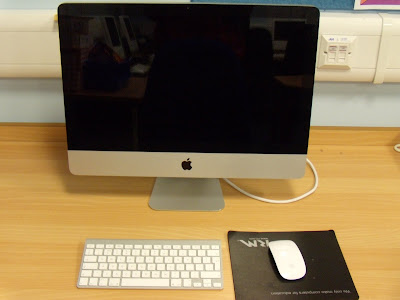
I used the iMovie software to upload my footage from the Canon camera. Because my filming had been split across two cameras due to batteries dying I had some filming on an SD card. Luckily there is a built in slot on the iMac for this so I could just select iMovie > Import Movies...
This allowed me to bring in the clips as they were from the SD card. There were more clips on the SD card as the camera saved them as individual files whereas the Canon camera recorded onto a tape which was uploaded as one solid clip.
I created a new project in iMovie and a new event. The event is where the filming is kept before it is edited. The title 'event' comes from the basis of the time it was recorded. For example a birthday, wedding or Christmas. The project is where all the editing happens and is titled project because it essentially is. You can bring clips from the wedding, birthday and Christmas togther in the project section as a montage.
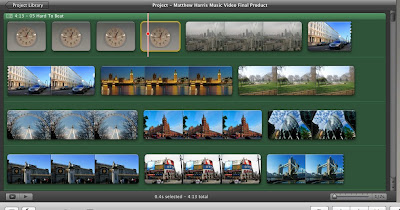
I then decided after creating the first 14 seconds that I wanted to do all of the editing in one solid chunk. To do this I moved the files from the large iMac to the MacBook Pro. This also has iMovie and I just opened up the project in the program after inserting the file to where the project files are stored. I added the movie files into the events library and was able to do the editing in one weekend.
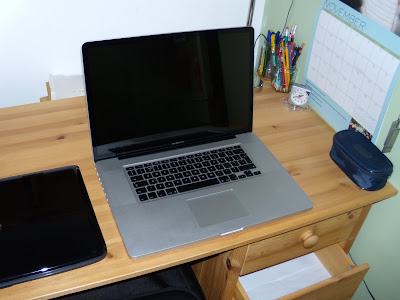
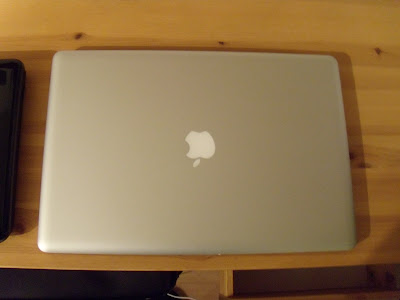
I used the clip editor to slow down and speed up the clip. This allowed me to get the lip syncing dead on as the clip could be slowed down by a percentage or sped up by a percentage. There was also another way of doing it, underneath the percentage box is a time box; so if I wanted a clip to be so long with no lip syncing I could just type the length and the program automatically worked it out.
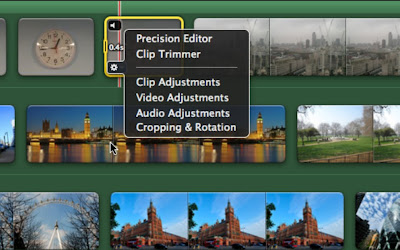
I inserted some still images into the film too. These were mainly to set the atmosphere of the video and create a busy city feel. I used iPhoto to insert the images I had taken from one of my annual London trips. The images were of many things but above all places that would be recognisable to the target audience. Some where of expensive cars and this helped denote the wealth implied in the film; the main concept was boy sees upper class girl > boy chases upper class girl and eventually boy gets girl. To zoom in on the images and give the effect of zooming I used Cropping, Rotation, and Ken Burns. The Ken Burns allows me to have a starting point for the beginning of the clip and a different end point at the end of the clip. Ken Burns then automatically creates a seamless movement between the two points.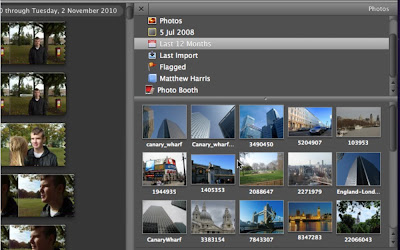
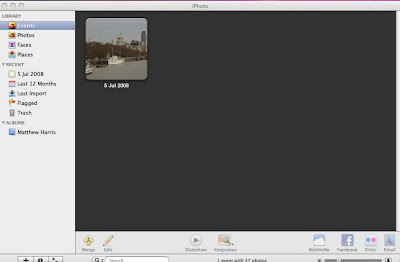
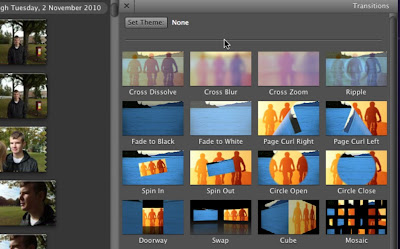
 For the part of the video that mentions ''I think you've turned it 'round" I took a still image of London's Canary Wharf and used the rotation effects with transitions to give the effect of spinning. The transition I used was Cross Dissolve; this allowed the pictures to merge into each other with each one being a further 90 degrees around.
There are many transitions available but as it's not a film type production it doesn't need to have transitions. Transitions are more of a slow effect to add continuity between scenes which helps the story line move. In a music video straight cuts are the most common cut between scenes as the story line is fairly easy. The producers know that the storyline has to be easy to pick up in the short time that it's on the air other wise it won't make sense. This eliminates the need for transitions. The music also acts as a carrier of the story line which allows the video to flow.
To import the song over the top of the video I used the integrated iTunes link. This is a perfect example of synergy within the software. It allows me to just click and drag the song on top of the video and it applies it self to the clip.
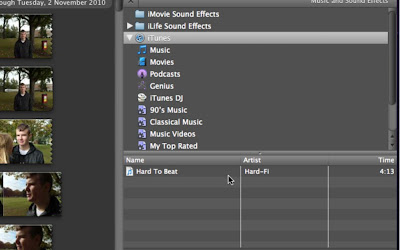
When editing I had to alter the level of sound on each individual clip. This meant opening the Clip Adjustments/Audio Adjustments and lowering the sound level to zero percent. By doing this the video should have played with no external sound from the clips. However when playing the video through in full screen mode and when viewing the video through a DVD some sound from the clips started playing as if it had never been turned off.
I later found that there is a small glitch with Apple's iMovie software in that if you use the percentage editor for the clip speed it doesn't alter the sound even if it show the sound level at zero. To combat this I tried removing the sound from the clip entirely. That didn't work as it cannot be done (to my knowledge). I then fiddled around with the Ducking Adjustments in the Audio Adjustments.
Ducking allows the sound levels to be altered when there is two or more sound tracks to a clip. The standard is set as 'Duck the levels of other sound tracks to 15% when this clip plays' I then altered this level to 100% so that the music would play at 100% volume over the top of the other sounds. I then altered the level of the music to 200% to make sure nothing could be heard.
Unfortunately by raising the music level to 200% the sound quality isn't that great when watched on YouTube.
I used the iMovie software to upload my footage from the Canon camera. Because my filming had been split across two cameras due to batteries dying I had some filming on an SD card. Luckily there is a built in slot on the iMac for this so I could just select iMovie > Import Movies...
This allowed me to bring in the clips as they were from the SD card. There were more clips on the SD card as the camera saved them as individual files whereas the Canon camera recorded onto a tape which was uploaded as one solid clip.
I created a new project in iMovie and a new event. The event is where the filming is kept before it is edited. The title 'event' comes from the basis of the time it was recorded. For example a birthday, wedding or Christmas. The project is where all the editing happens and is titled project because it essentially is. You can bring clips from the wedding, birthday and Christmas togther in the project section as a montage.
I then decided after creating the first 14 seconds that I wanted to do all of the editing in one solid chunk. To do this I moved the files from the large iMac to the MacBook Pro. This also has iMovie and I just opened up the project in the program after inserting the file to where the project files are stored. I added the movie files into the events library and was able to do the editing in one weekend.
I used the clip editor to slow down and speed up the clip. This allowed me to get the lip syncing dead on as the clip could be slowed down by a percentage or sped up by a percentage. There was also another way of doing it, underneath the percentage box is a time box; so if I wanted a clip to be so long with no lip syncing I could just type the length and the program automatically worked it out.
I inserted some still images into the film too. These were mainly to set the atmosphere of the video and create a busy city feel. I used iPhoto to insert the images I had taken from one of my annual London trips. The images were of many things but above all places that would be recognisable to the target audience. Some where of expensive cars and this helped denote the wealth implied in the film; the main concept was boy sees upper class girl > boy chases upper class girl and eventually boy gets girl. To zoom in on the images and give the effect of zooming I used Cropping, Rotation, and Ken Burns. The Ken Burns allows me to have a starting point for the beginning of the clip and a different end point at the end of the clip. Ken Burns then automatically creates a seamless movement between the two points.
For the part of the video that mentions ''I think you've turned it 'round" I took a still image of London's Canary Wharf and used the rotation effects with transitions to give the effect of spinning. The transition I used was Cross Dissolve; this allowed the pictures to merge into each other with each one being a further 90 degrees around.There are many transitions available but as it's not a film type production it doesn't need to have transitions. Transitions are more of a slow effect to add continuity between scenes which helps the story line move. In a music video straight cuts are the most common cut between scenes as the story line is fairly easy. The producers know that the storyline has to be easy to pick up in the short time that it's on the air other wise it won't make sense. This eliminates the need for transitions. The music also acts as a carrier of the story line which allows the video to flow.
To import the song over the top of the video I used the integrated iTunes link. This is a perfect example of synergy within the software. It allows me to just click and drag the song on top of the video and it applies it self to the clip.
When editing I had to alter the level of sound on each individual clip. This meant opening the Clip Adjustments/Audio Adjustments and lowering the sound level to zero percent. By doing this the video should have played with no external sound from the clips. However when playing the video through in full screen mode and when viewing the video through a DVD some sound from the clips started playing as if it had never been turned off.
I later found that there is a small glitch with Apple's iMovie software in that if you use the percentage editor for the clip speed it doesn't alter the sound even if it show the sound level at zero. To combat this I tried removing the sound from the clip entirely. That didn't work as it cannot be done (to my knowledge). I then fiddled around with the Ducking Adjustments in the Audio Adjustments.
Ducking allows the sound levels to be altered when there is two or more sound tracks to a clip. The standard is set as 'Duck the levels of other sound tracks to 15% when this clip plays' I then altered this level to 100% so that the music would play at 100% volume over the top of the other sounds. I then altered the level of the music to 200% to make sure nothing could be heard.
Unfortunately by raising the music level to 200% the sound quality isn't that great when watched on YouTube.
Other Marketing
When a band releases a new album they generally do a tour to promote it. The tour will consist of television interviews and concerts across the country or globe.
This is what a poster may look like advertising a Hard Wi concert.

This is what a poster may look like advertising a Hard Wi concert.
The concert tickets may look something like this.
Tuesday, 30 November 2010
My Final Production Hard Wi - Hard to Beat
This is a link to my music video. I filmed the video in Northampton and I have included pictures of London so that people think that the video is filmed in London.
The filming and editing took several days all together and it took time to get the lip syncing right.
Monday, 22 November 2010
Filming
Today we filmed in Northampton.

It was a really fantastic day. The weather held off until the evening and we managed to film in the park with little interuption.
We filmed up and down Gold Street first after meeting outside the VUE cinema. When we had finished the filming we ate at the original Buddy's and went home via train.
The backup camera came in handy and so did the back up batteries. The school camera ranout of power about 3/4 of the way through filming and so I used the digital camera of mine. The batteries in this quickly died and I changed them to get the last of the filming done.
Possible Filming Techniques: Boom Arm
To achieve a really long moving shot I could use an improvised boom arm. I have borrowed my dad's mono pod to try this out.
http://www.youtube.com/watch?v=7BEKyN7EMag
http://www.youtube.com/watch?v=oPUSb9Ifb2M
http://www.youtube.com/watch?v=xQ37RYhNdNY
I have found that the boom arm needs to be counter weighted. The camera at the top of the arm is weighty and pulls down the arm. When I am holding the arm it tends to shake and the camera wobbles. To balance this out it would need to be fitted to a rig that has a pivot point in the middle allowing for the camera to be slightly weighted against the counter weight. This way camera would move down in a fluent movement.
http://www.youtube.com/watch?v=7BEKyN7EMag
http://www.youtube.com/watch?v=oPUSb9Ifb2M
http://www.youtube.com/watch?v=xQ37RYhNdNY
I have found that the boom arm needs to be counter weighted. The camera at the top of the arm is weighty and pulls down the arm. When I am holding the arm it tends to shake and the camera wobbles. To balance this out it would need to be fitted to a rig that has a pivot point in the middle allowing for the camera to be slightly weighted against the counter weight. This way camera would move down in a fluent movement.
Saturday, 20 November 2010
Possible Filming Effects: Blood
The next technique I am have tried is blood. To create the blood all I used was pure red food colouring. I used in a sink for two reasons. One I wasn't aloud to try it on any other surfaces in the house and two it seemed like the best place to use it in a video.

The first attempt went wrong in a way because the sink was wet. This meant that all of the colouring bled into the water that was already there.
I realised that at the top where the sink was dry it looked better so I washed the sink down and dryed it out. By washing the sink down I could see that the colouring acted similar to blood.
http://www.youtube.com/watch?v=jqk1S4yCpyo
The second attempt was so much better. The fake blood looked life like and moved in the same way. It moved at the same speed and was dark enough too. If the blood does look a bit light in some places it can be put down to the sink being white.
http://www.youtube.com/watch?v=8Bigg1Po9jY


Possible Filming Effects: Police Lights
I have been looking into possible filming techniques that I could use in my film if I needed to.

As I have already storyboarded this should not be necessary but it's nice to know if the technique works or not.
The police lights effect can be created in a dark room with a pair of novelty magnet lights I bought years ago. They flash just like police lights and they reflect off of anything in the way of the light.
http://www.youtube.com/watch?v=c3YPxMadv6cThe police lights effect can be created in a dark room with a pair of novelty magnet lights I bought years ago. They flash just like police lights and they reflect off of anything in the way of the light.
Monday, 15 November 2010
My Location
I plan to film in Northampton. On the map below provided by Google Earth there is a marked out area where I plan to film.

Beckett's Park provides the perfect green space in a town location for my video and the landscape's hills and hollers allow for the right effect.
Beckett's Park provides the perfect green space in a town location for my video and the landscape's hills and hollers allow for the right effect.
My Equipment
This is the equipment that I have booked out for use over the holiday.
A Jessops Tripod.
A Jessops Tripod.

A Canon MD 205 Camera.
For extra emergancy safety I will also be taking my digital photgraphy camera as it also has a film application with it. And to back up this I will be taking 3 sets of extra batteries. This way I know that I have enough back up options to get all of the filming done.

The Weather
Lately it has been very rainy but I have planned ahead and looked at the weather forecast for the shooting day.

Me being the ultimately clever person that I am I may have forgotten to scroll down to the right part of the day's weather. So now that section of the weather report is gone forever. However I can tell you that the next time frame was at 10:00 a.m. and it did say cloudy but sunny spells. I remember this because I remember thinking that it was just at the right time for when we would be filming. After that it said rain at 1:00 p.m.
I am going to take umbrellas anyway because I don't want to ask George and Emily into town and get them wet because that's just rude to say the least.
My Actor
The actor in my video is one of my best friends. I asked him at the begining of the year if he would star in my music video and he agreed.  George Caswell is completing the same media course as me and while we have different songs with different concepts he knows what I have to achieve. This is helpful to me because he knows what the main aims and goals of the project are and what the breif is. He is also a keen musician like his girlfriend Emily Hare so they are on hand if I need any 'industry' advice.
Thank you George for starring in my film!
George Caswell is completing the same media course as me and while we have different songs with different concepts he knows what I have to achieve. This is helpful to me because he knows what the main aims and goals of the project are and what the breif is. He is also a keen musician like his girlfriend Emily Hare so they are on hand if I need any 'industry' advice.Thank you George for starring in my film!
My Actress
This is the actress in my music video.

Emily Hare is a very good friend and has very nicely agreed to be in my music video with her boyfriend of two years + George Caswell.
Emily has also amazingly been so kind as tolet me have complete control over her hair and wardrobe. This means that I can create the right effect in my video.
I would just like to take the chance to say Thank you to Emily for being Great and starring in my video!
Planning: Preparation Including Porps, Equiptment, and Control of Location
I have found my two actors and we have set a date of the 23rd October 2010.
We are planning on meeting up in town and filming through out the course of the morning and into the afternoon.
The only prop needed in the film should be the girl's phone. My actress will have her phone with her anyway and if need be I shall have mine to hand that we can use.
The equipment needed will be one tripod and one camera. I have booked these out from the school media department.
The location is a public place and so I have no control over that or who walks into the shot but I think it will give the video a more realistic effect.
Subscribe to:
Posts (Atom)